

Reading a fault code is only half the diagnostic picture. A bi-directional diagnostic scan tool in India can read vehicle data and, when the vehicle and tool support the function, send commands to components for active tests. That distinction helps explain why two scanners that both read codes may offer very different diagnostic capabilities.
Fault codes and live data are useful starting points, but an active test can show how a supported component responds to a command. The right tool depends on the vehicle, the systems you need to access and whether you require functions such as ECU coding or ADAS identification. This guide compares basic, handheld, Bluetooth and advanced scanners, explains what all-system scans cover, and shows where bi-directional controls fit. It also outlines what to consider before an active test, helping you match scanner capabilities to the task instead of choosing by feature list alone.
Key Takeaways
- Separate code reading from bi-directional controls: active tests can command supported components and show how they respond.
- Match scanner capability to the vehicle and task, from basic powertrain checks to broader system access and ECU coding.
- Understand what all-system scans and ADAS identification can reveal, and where scan tools cannot diagnose mechanical wear.
- Use OBD tools to support vehicle diagnostics, and choose features based on the systems and tests you need to access.
Bi-directional controls and ECU coding
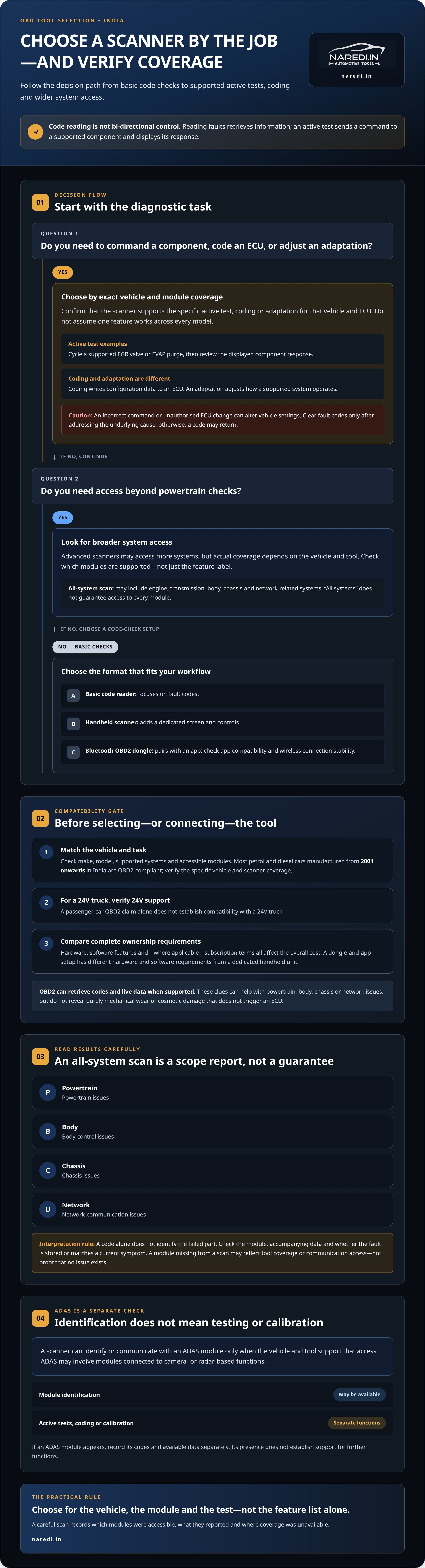
A scan tool with bi-directional controls can do more than read stored faults: it can send commands to selected vehicle components and display their responses.
Vehicle Reset Functions
Reset functions can support specific tasks after diagnosis, but availability depends on the vehicle and the tool’s coverage. A reset changes a system’s recorded state; an active test commands a component to respond. Clear fault codes only after addressing the underlying cause. Otherwise, the code may return without resolving the fault.
Coding and Adaptations
Coding writes configuration data to an ECU, while an adaptation adjusts how a supported system operates. Available options vary by vehicle, ECU and scanner. Before choosing a tool, identify the vehicle and module, then confirm that it supports the required coding or adaptation function. Commercial tools connected through an OBD port can write to ECU memory, creating a risk of unauthorised changes, according to the European Union.
Supported Active Tests
Which bi-directional scan tools support active tests, coding and adaptations? Choose a tool whose vehicle-specific coverage includes the function you need. Support varies by vehicle and module, so no single capability applies to every model. For an active test, select a supported component and command it through the scanner. Examples include cycling an EGR valve or EVAP purge for diagnostic checks. The displayed response can help distinguish a command issue from a component response.
What risks come with using bi-directional controls or coding on a vehicle? An incorrect command or unauthorised ECU change can alter vehicle settings. Use only functions supported for the specific vehicle and module, and address the fault before clearing its code.
Comparing basic, handheld, Bluetooth and advanced scanners
Scanner choice depends on the vehicle, the systems to diagnose and the functions required. In India, most petrol and diesel cars manufactured from 2001 onwards are OBD2-compliant.
A scan tool does not replace a mechanic’s judgement. Using diagnostic equipment is separate from permission to perform other regulated work or make ECU changes.
Scanner Types and Diagnostic Systems
Basic code readers focus on fault codes, while handheld scanners add a dedicated screen and controls. Bluetooth OBD2 dongles pair with an app and offer a practical option for many users. Advanced scanners may provide broader system access, but features depend on vehicle coverage. OBD2 communicates with vehicle control units, letting a scanner retrieve codes and live data when supported.
Codes and live data can help identify powertrain, body, chassis or network issues. They cannot reveal purely mechanical wear or cosmetic damage that does not trigger an ECU.
Vehicle Compatibility and Wireless Connection
Compatibility depends on the vehicle’s OBD2 support, make, model and accessible systems. Before selecting a scanner, match its coverage to the vehicle and the diagnostic task, such as reading powertrain data or accessing other modules. A Bluetooth dongle also depends on a compatible app and a stable wireless connection between the dongle and device.
For a 24V truck, check that the scanner’s stated vehicle and electrical-system compatibility covers that truck. A passenger-car OBD2 claim alone does not establish 24V support.
Hardware, Software, and Subscription Costs
Hardware cost depends on the scanner type, screen, connection method and supported diagnostic functions. Software determines which vehicle systems, data views and service functions are available. Where applicable, subscription costs depend on the tool’s software terms and access model.
Compare the complete ownership cost, not just the device price. For example, a Bluetooth dongle paired with an app differs from a dedicated handheld unit in hardware and software requirements. Explore diagnostic OBD tools when choosing equipment for vehicle checks.
All-system scans and ADAS identification
An all-system scan checks accessible electronic control units across a vehicle instead of limiting results to the powertrain. Coverage depends on the vehicle and scanner, so an “all systems” label does not guarantee access to every module.
For example, a scan may include engine, transmission, body, chassis and network-related systems. Review which modules respond, which report faults and which are unavailable. A module missing from the scan does not prove there is no issue; the gap may reflect tool coverage or communication access.
Fault-code prefixes help organise results: P-codes indicate powertrain issues, B-codes body-control issues, C-codes chassis issues and U-codes network-communication issues. Use these categories as a starting point, then compare each code with its module and accompanying data. A code alone does not identify the failed part.
- Confirm scan scope: Record the vehicle identity and the modules the tool can access.
- Review each result: Note codes and live data by module, including engine or body-control entries.
- Interpret carefully: Separate a stored fault from a current symptom before deciding on a diagnostic next step.
ADAS identification is a separate coverage question. Advanced driver-assistance systems may involve modules connected to camera- or radar-based functions. A scanner can identify or communicate with an ADAS module only if the vehicle and tool support that access. An ADAS entry does not mean the scanner can test, code or calibrate the system.
For example, if a scan displays an ADAS module, note its reported codes and available data separately from engine results. Distinguish identification from further functions: module access, active tests and calibration are not interchangeable. The vehicle’s equipment and the scanner’s supported functions determine what appears. A careful report names accessible modules and their results, rather than treating one successful scan as proof that every system was checked.
Bi-directional active tests
An active test lets a scan tool send a command to a supported vehicle system. Its diagnostic value comes from comparing the command with the component’s response, not simply retrieving a fault code.
How do you use a bi-directional diagnostic scan tool safely, step by step? Identify the vehicle and target system, record existing faults, then select a supported test. Follow the scanner prompts, observe the response and stop if the result is unexpected.
- Prepare the vehicle: Park securely and keep people clear of components that may move, such as a radiator fan or door lock. Follow the scanner’s instructions for ignition state and connection.
- Record the starting point: Read the relevant module’s codes and available live data before commanding a component. This creates a reference for interpreting the test.
- Select the exact test: Choose the system and command shown for that vehicle. For example, target the listed fan control during a fan activation test.
- Observe the response: Compare the scanner’s command status with the component’s behaviour. If the command registers without the expected response, investigate further rather than assuming a failed part.
- End and review: Stop the test using the scanner’s displayed control. Recheck relevant codes and record any changes before deciding on another diagnostic step.
Active tests help examine a symptom under a controlled command. If a fan does not respond as expected, further checks of its component, wiring or control path may be needed. The result is evidence, not a complete diagnosis. For technicians assessing bi-directional diagnostic scan tools in India, supported vehicle commands should guide tool selection. Coverage varies by vehicle and system, so the scanner’s displayed test list shows which functions are available.
A bi directional diagnostic scan tool India workshops choose should suit the vehicle and the specific test, rather than relying on a broad feature label. Use diagnostic tool options to find equipment suited to supported vehicle tests.
Naredi.in: OBD Tools
naredi.in offers OBD Tools for readers choosing diagnostic equipment for vehicle checks. Choose a scanner suited to your vehicle and intended task, such as reading fault codes or reviewing supported data. Bi-directional commands, coding and module access depend on the specific tool and vehicle, so match those functions to your requirements.
For related vehicle-care needs, naredi.in also offers Battery Chargers, Battery Testers and Performance Additives. Its products are sourced directly from OEM manufacturers and described as 100% genuine. These categories serve different purposes: diagnostic tools access vehicle information, while battery equipment supports battery testing or charging.
Contact naredi.in to discuss OBD Tools for your diagnostic needs.
Make Your Next Diagnostic Decision Deliberate
Choose equipment for the work you expect it to support, not the longest feature list. When selecting a bi-directional diagnostic scan tool in India, first define your vehicle coverage and intended diagnostic tasks. This gives technicians and informed vehicle owners a clearer basis for choosing practical equipment for their workflow.
Diagnostic equipment is one part of a broader vehicle-care toolkit. naredi.in also offers Battery Chargers, Battery Testers and Performance Additives, each for a different need. Keeping these categories distinct helps you focus on equipment relevant to your next task.
Ready to take that next step? Contact naredi.in about scan tools and move forward with a clear view of your diagnostic needs.
Frequently Asked Questions
What is a bidirectional diagnostic scan tool and how does it work?
A bi-directional diagnostic scan tool reads supported vehicle data and sends commands to selected systems. Capabilities in the bi-directional diagnostic scan tool category in India vary by vehicle and tool. For example, a technician can command a supported component and observe its response. That response helps guide further investigation, but does not by itself confirm which part has failed.
Which scan tools support Indian car brands and models?
Support depends on the scanner’s vehicle coverage and the function required. Most petrol and diesel cars manufactured in India from 2001 onwards are OBD2-compliant, but this alone does not ensure access to every module or active test. For Indian models, compare the listed make, model and year coverage with the functions you need, such as engine data or broader system access.
How can I check whether a scan tool is compatible with my vehicle before buying?
Start with your vehicle’s make, model and year, then match them against the tool’s compatibility information. For a bi directional diagnostic scan tool India buyers should also compare the specific diagnostic functions they need, such as module access or active tests. OBD2 compatibility alone doesn’t guarantee those features. For a Bluetooth tool, confirm that its connection method works with your device.
What are the prices of bidirectional diagnostic scan tools in India?
Overall costs can also depend on hardware, software, supported functions and subscription terms.
Where can I buy a bidirectional scan tool in India, and what warranty and support are offered?
naredi.in offers OBD Tools. Warranty and support details are not available here.