

The most capable option isn’t always the right one: for occasional engine-code checks, a handheld reader is usually enough; for phone-based diagnostics, choose a Bluetooth OBD2 scanner that works with your device and app. The choice between a Bluetooth OBD2 scanner and a handheld code reader comes down to how you want to view vehicle data and how much diagnostic coverage you need.
A handheld reader has its own screen and software, so you can use it without a phone. A Bluetooth scanner plugs into the vehicle’s OBD2 port and sends data to an app on a smartphone or tablet. That means your phone’s operating system and the scanner’s Bluetooth compatibility matter, while a professional tool may offer access to more vehicle systems.
This guide compares handheld readers, Bluetooth scanners and professional tools by connection, display, diagnostic features and compatibility. You’ll learn what each option can do, where basic engine-code reading stops, and which features suit your needs in India. The goal is to help you choose between a simple code check, live engine data on your phone or broader diagnostic access.
Key Takeaways
- Match the reader to the diagnostic depth you need, from basic engine codes to access across multiple vehicle systems.
- Choose a Bluetooth interface that supports your phone’s operating system and works with its diagnostic app.
- Consider whether a direct cable connection or wireless phone display better suits your typical diagnostic tasks.
- Understand what a Bluetooth dongle can report through an app, including fault codes and live engine data.
Best OBD2 Code Reader: Handheld, Bluetooth or Pro Tool?
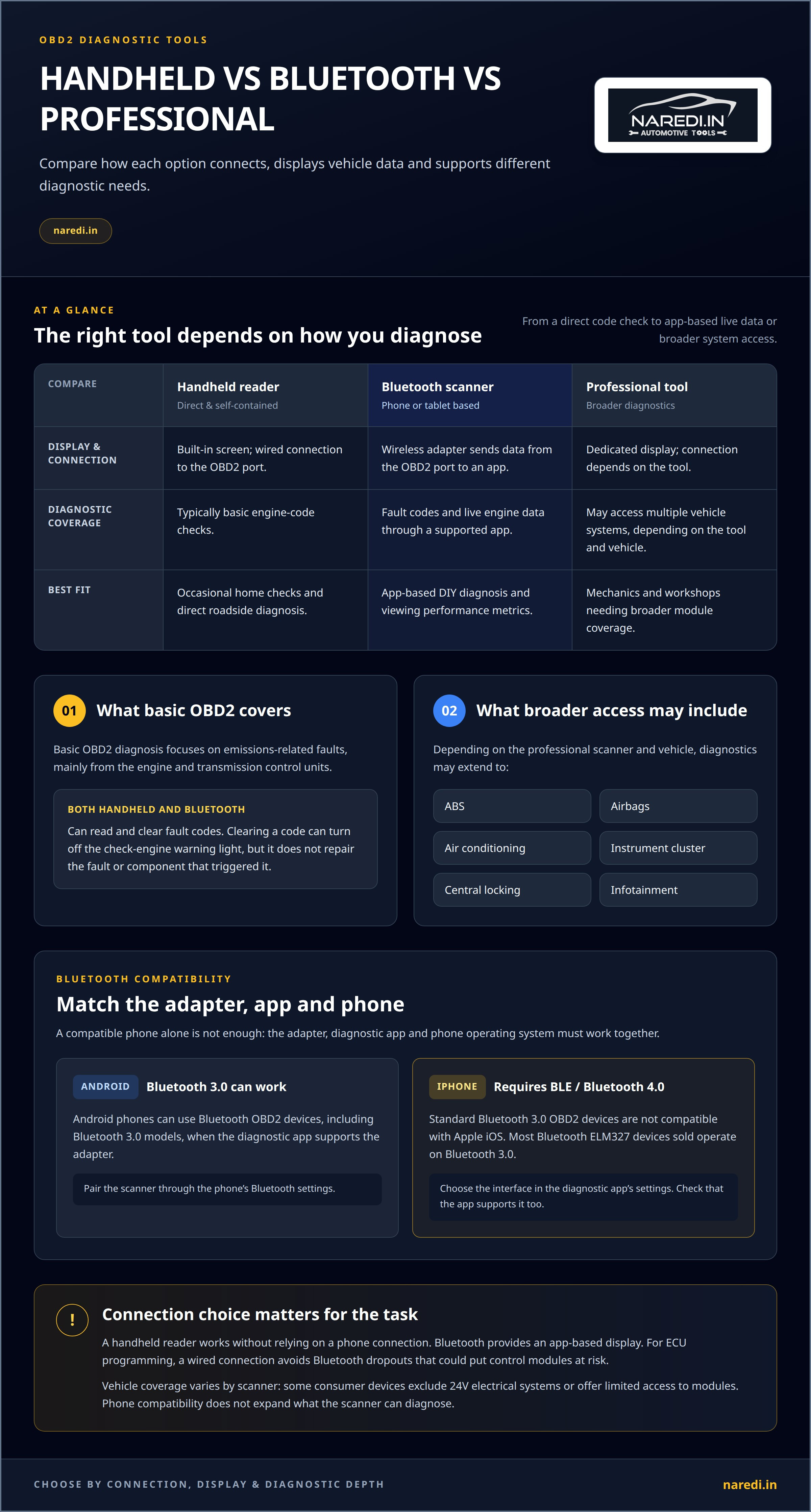
A basic OBD2 diagnostic tool reads emissions-related faults, mainly from the engine and transmission control units. A handheld reader shows codes on its own screen, while a Bluetooth scanner sends data to a phone app. Both can read and clear fault codes, and clearing one can turn off the check-engine warning light. It doesn’t repair the component or fault that triggered it.
Full-system diagnostics reach beyond engine and transmission faults. Depending on the tool and vehicle, a professional scanner may access ABS, airbags, air conditioning, the instrument cluster, central locking and infotainment. An OBD2 scanner and app can also display live engine parameters. That helps DIY users observe data, while workshops may need broader module coverage to diagnose faults across vehicle systems.
For occasional home checks, a basic handheld reader keeps the process direct. Bluetooth suits drivers who want app-based readings or performance metrics. Mechanics and workshops benefit from a professional tool when they need full-system access. For roadside diagnosis, a handheld reader avoids relying on a phone connection, while Bluetooth offers a phone display. The practical bluetooth obd2 scanner vs handheld code reader choice depends on where and how you diagnose.
| Option | Display and connection | Typical coverage | Best fit |
|---|---|---|---|
| Handheld reader | Built-in screen; wired | Basic engine codes | Occasional home checks |
| Bluetooth scanner | Phone or tablet app; wireless | Codes and live data | App-based DIY diagnosis |
| Professional tool | Dedicated display; tool-dependent | Potentially multiple vehicle systems | Workshop diagnostics |
Connection type affects use. Bluetooth pairs wirelessly with an app; WiFi uses a wireless network, while USB links the interface to a device by cable. Connection type can affect whether a phone stays connected to the internet during diagnostics. For ECU programming, a wired connection avoids Bluetooth dropouts that could put control modules at risk. This is another factor in the bluetooth obd2 scanner vs handheld code reader decision.
Choose an app that supports the scanner and your phone’s operating system, then compare code-reading, clearing and live-data functions. Check vehicle and module coverage too: some consumer scanners exclude 24V electrical systems or provide limited module access. The right tool depends on the systems you need to diagnose and the connection that suits your work.
Bluetooth scanner compatibility with Android and iOS
Match the scanner’s Bluetooth standard to your phone and diagnostic app. Whether it draws power while the ignition is off depends on the vehicle’s OBD port and the adapter design. Unplug it before leaving it connected during extended parking.
Bluetooth Low Energy and ELM327
Bluetooth Low Energy, also called Bluetooth 4.0, is the key compatibility distinction for iPhone users. An iPhone needs a scanner that supports Bluetooth 4.0 or BLE; standard Bluetooth 3.0 OBD2 devices aren’t compatible with Apple iOS. Most Bluetooth ELM327 devices sold operate on Bluetooth 3.0, so they won’t work with an iPhone. Android phones can use Bluetooth OBD2 devices, including Bluetooth 3.0 models, when the app supports the adapter.
Adapter and App Compatibility
The adapter provides the wireless link, while the diagnostic app displays vehicle information and controls supported functions. The adapter, app and phone must all work together. On Android, pair the scanner through the phone’s Bluetooth settings. On an iPhone, select the interface in the diagnostic app’s settings. An iPhone-compatible BLE adapter won’t make an unsupported app compatible, so check both the connection standard and app support.
Phone compatibility doesn’t establish vehicle coverage. OBD2 scanners can have different access to vehicle models and control modules, and some consumer devices exclude 24V electrical systems. Basic OBD2 coverage focuses on emissions-related faults, rather than every dashboard warning or vehicle component. Coverage can also vary between engine and transmission diagnostics and access to systems such as ABS or airbags. A compatible phone cannot expand the scanner’s capabilities.
To connect, plug the adapter into the vehicle’s OBD port and switch on the ignition. On Android, pair it in Bluetooth settings, then open the supported app. On iPhone, open the app and choose the interface in its settings. If the app can’t find the adapter, confirm that the phone’s operating system, Bluetooth standard and app support that scanner. This helps distinguish phone-pairing issues from vehicle-coverage limits.
Handheld cable-based readers versus Bluetooth app-based scanners
The main difference is the interface: a handheld reader has its own screen, while a Bluetooth adapter uses a phone app. Both connect through the vehicle’s OBD2 port, but the display and connection method change how you use each device.
Handheld Cable-Based Readers
A cable-based handheld reader combines the diagnostic interface, screen and controls in one device. Plug it into the OBD2 port, switch on the ignition, then read supported fault codes on its display. You don’t need a separate phone or app, which makes this setup direct for checking a check-engine light beside the vehicle.
A handheld reader’s wired connection avoids reliance on a Bluetooth signal. That can matter during longer tasks such as ECU programming, when a dropped wireless connection may put vehicle control modules at risk. Available functions still depend on the tool and vehicle, including support for the engine or diesel-vehicle coverage you need.
Bluetooth App-Based Scanners
A Bluetooth OBD2 adapter plugs into the vehicle’s port and sends diagnostic data wirelessly to a smartphone or tablet. The phone becomes the display and control interface, while the app provides supported functions such as reading codes or viewing live engine parameters. Unlike a handheld reader, the adapter itself usually has no screen for displaying results.
A Bluetooth scanner suits drivers who prefer viewing information on a phone, but it adds compatibility requirements: the adapter, app and phone must work together. Bluetooth pairing also introduces a wireless link that can drop. Use a Bluetooth scanner for performance metrics, but avoid relying on it for programming tasks that require a stable connection.
For a basic roadside check, a handheld reader keeps the screen and controls together. For DIY monitoring, a Bluetooth adapter can show live data through an app while the phone remains in hand. In either case, code access depends on the scanner’s supported functions and the vehicle’s OBD2 coverage, not just the connection type.
Bluetooth OBD2 dongle features
A Bluetooth OBD2 dongle plugs into the vehicle’s OBD2 port and sends diagnostic data wirelessly to a smartphone or tablet. The adapter provides the connection; a compatible app supplies the interface, display and software controls. This setup separates the vehicle connection from the screen, so the app shapes how you view and use the information.
Supported apps can read and clear fault codes and monitor live engine parameters. For example, a driver investigating a check-engine warning can read the code, then review available live readings to inform the next diagnostic step. Clearing a code may switch off the warning, but it doesn’t fix the underlying fault. The stored code is useful diagnostic information, not proof that a component has been repaired.
In the Bluetooth OBD2 scanner vs handheld code reader comparison, a dongle suits drivers who want to view supported data through a phone app. A handheld reader suits someone who prefers a standalone display. Neither connection type determines diagnostic coverage by itself. The adapter, app and vehicle all affect which electronic systems and functions are accessible.
For example, a dongle may read emissions-related faults without reaching every control unit. If a warning involves ABS or airbags, the scanner needs access to those systems. Some consumer tools also exclude 24V electrical systems or offer limited module coverage. The Bluetooth OBD2 scanner vs handheld code reader choice should therefore account for the vehicle systems you need, not only the screen you prefer.
A Bluetooth connection lets your phone remain connected to the internet during diagnostics; a WiFi ELM327 setup doesn’t provide that same phone internet access. However, a dropped Bluetooth signal can put control modules at risk during vehicle computer programming, so a dongle is not the right connection for that task. Match the adapter and app to your diagnostic needs, then use the readings to guide further investigation. Explore diagnostic tool options for a suitable setup.
Naredi.in
naredi.in offers vehicle equipment that can support decisions prompted by diagnostic results. If a warning or starting issue raises questions about battery condition, a Battery Tester can assess the battery, while a Battery Charger supports charging needs. Jump Starters and Performance Additives serve other vehicle requirements, depending on the task.
These products serve different purposes from a code reader: they don’t replace fault-code diagnosis or repair. Use the diagnostic information to identify what you need to address, then choose the product category that fits. Browse naredi.in’s automotive tools and equipment for the product suited to your vehicle requirement.
Make Your Next Diagnostic Choice Count
Choose a tool around the decisions you need to make, not the number of features on its screen. The bluetooth OBD2 scanner versus handheld code reader decision is a starting point: match the device to your phone, vehicle coverage and regular diagnostic tasks. Then use its readings to guide your next step, rather than treating a cleared warning as proof that a fault is repaired.
If diagnostic findings point to a battery-related need, naredi.in offers Battery Testers and Battery Chargers. Performance Additives are also available for other vehicle care needs. These products complement diagnostic tools but serve different purposes, so start with the requirement you’ve identified.
Keep your next step practical: select equipment that fits the task and the way you work. Contact naredi.in to discuss your needs, and move forward with a clearer fit for your vehicle.
Frequently Asked Questions
How do you connect a Bluetooth OBD2 to your smartphone?
Connect the adapter using the method its app supports, then confirm the app recognises the interface before starting a scan. On Android, pair it in the phone’s Bluetooth settings; on iPhone, select the adapter within the diagnostic app. If it doesn’t appear, check the app’s device list and make sure another phone isn’t already connected to the adapter.
How should I approach “edge-case” situations when choosing a scanner?
Choose a scanner for the least-supported task you expect to perform, not just routine engine checks. For example, a workshop programming an ECU should prioritise a stable wired connection, while a driver diagnosing a non-engine warning needs access to that vehicle system. Consider your phone’s operating system and any vehicle voltage or module limitations, too. These factors can rule out an otherwise suitable tool.
Which vehicle diagnostics can Bluetooth OBD2 scanners and handheld code readers perform?
Both types can diagnose supported faults, but their functions depend on the tool and vehicle. A basic reader may identify an engine code, while a more capable scanner may show live parameters or access other control modules. Record the code and its context before clearing it: removing a dashboard warning doesn’t fix the fault or explain why it appeared.
Do Bluetooth OBD2 scanners work with Android and iPhone apps?
Yes, when the adapter’s Bluetooth standard and the diagnostic app support the phone. Android can pair with Bluetooth OBD2 devices through its settings. For iPhone, choose a Bluetooth Low Energy interface, also called Bluetooth 4.0; standard Bluetooth 3.0 OBD2 devices aren’t compatible with Apple iOS. Don’t assume every ELM327 adapter works across both platforms. App support matters as well.
Which OBD2 protocols and vehicle models in India are supported by each type?
Common OBD-II protocols include SAE J1850, ISO 9141-2, ISO 14230 (KWP2000) and CAN. Support varies by scanner, vehicle and system, so there isn’t one universal model list for handheld or Bluetooth tools in India. Match the vehicle’s make, model and year to the tool’s stated coverage, and confirm it supports the protocol and control modules needed for your diagnostic task.
How much do Bluetooth OBD2 scanners and handheld code readers cost in India?
There’s no fixed price for either type in India. Cost depends on whether you need basic engine-code reading, app-based live data, broader module coverage or professional functions. A simple handheld reader and a multi-system professional scanner serve different needs, so compare their supported functions, not just their connection type. App or software requirements can also affect the overall cost of a Bluetooth setup.