

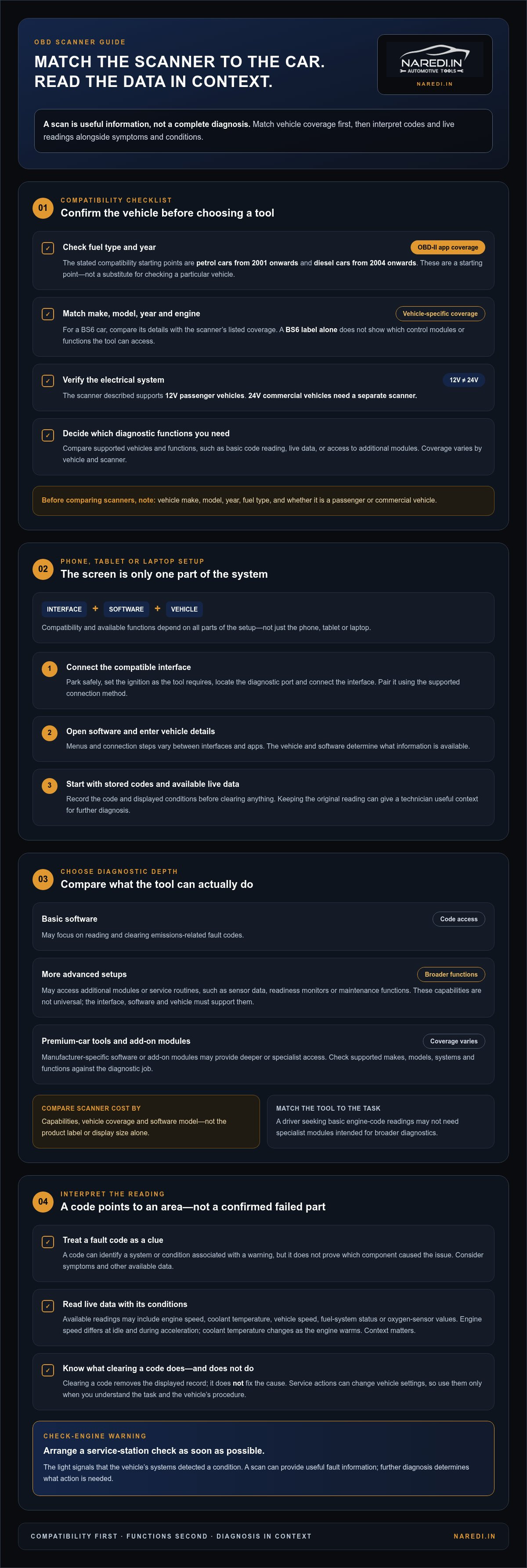
An OBD car scanner can read diagnostic information from a compatible vehicle and help you understand what a warning light may be signalling. For OBD-II app compatibility, the stated coverage is petrol cars from 2001 onwards and diesel cars from 2004 onwards. The scanner described here supports 12V passenger vehicles; 24V commercial vehicles need a separate scanner.
A check-engine light means the car’s systems have detected a condition, but the light alone cannot identify its cause. Take the car to a service station as soon as possible. A scan can provide useful fault information, while further diagnosis determines what action is needed.
This guide covers scanner options for Indian cars, phone-based diagnostics, what affects scanner prices, and how to interpret a check-engine warning without treating a code as a complete diagnosis. You’ll also learn which compatibility details to check when choosing an obd car scanner, so you can match the tool to your vehicle and the information you need.
Key Takeaways
- Match the scanner to your vehicle: the stated OBD-II coverage is petrol cars from 2001 onwards and diesel cars from 2004 onwards, while 24V commercial vehicles need a separate scanner.
- Phone, tablet and laptop diagnostics rely on a compatible scanner interface and software; choose a setup that suits how much diagnostic information you need.
- Compare scanner options by their vehicle coverage and diagnostic functions, not by price alone.
- A fault code can point to a system or condition, but it doesn’t by itself confirm the underlying cause.
- If the check-engine light comes on, arrange a service-station check as soon as possible and use scan results as diagnostic information.
Multi-brand car scanners for Indian vehicles
A multi-brand scanner can read diagnostic information from supported vehicle makes, but coverage varies by vehicle and scanner. Start by matching the tool to your car’s fuel type, model details and electrical system.
Vehicle Compatibility and BS6 Support
For OBD-II app compatibility, the stated coverage is petrol vehicles from 2001 onwards and diesel vehicles from 2004 onwards. These dates are useful starting points, not a substitute for matching the scanner to a particular vehicle.
For a BS6 car, compare the scanner’s listed vehicle coverage with the make, model, year and engine. A BS6 label alone doesn’t show which control modules or functions a scanner can access. The vehicle must also match the tool’s voltage: the scanner described here supports 12V passenger vehicles, while 24V commercial vehicles require a separate scanner.
ECU-Monitored Vehicle Data
The ECU monitors many parameters while the vehicle is running. These inputs help its control systems manage engine performance and detect conditions that may need attention. A scanner reads diagnostic information available through the vehicle’s systems; the details depend on the vehicle and scanner.
For example, an engine-related fault code can point to the system or condition associated with a warning. It doesn’t prove which component caused the issue. Consider the code alongside the vehicle’s symptoms and other available data, rather than treating it as a complete diagnosis.
Real-Time Vehicle Parameters
Live data shows changing readings while vehicle systems operate. Depending on the vehicle and scanner coverage, readings may include engine speed, coolant temperature, vehicle speed, fuel-system status or oxygen-sensor values. They can help show what a system is doing during the scan.
Consider the conditions when the readings were recorded. Engine speed, for example, differs at idle and during acceleration, while coolant temperature changes as the engine warms. A reading without context can mislead; reviewing related parameters together gives a clearer diagnostic picture.
Before choosing a multi-brand tool, note the vehicle’s make, model, year, fuel type and whether it is a passenger or commercial vehicle. Compare these details with the scanner’s supported coverage and the functions you need, such as code reading or live data. This helps distinguish basic fault-code access from broader diagnostics.
OBD2 car diagnostics using a phone, tablet or laptop
A phone, tablet or laptop can display vehicle data when paired with a compatible OBD2 interface and diagnostic software. The interface connects to the car’s diagnostic port; the device then shows information the vehicle and software can access. The screen is only one part of the setup. Compatibility and diagnostic functions depend on the interface, software and vehicle.
Connect the interface and read data
Park the vehicle safely and set the ignition as required by the tool. Locate the diagnostic port, connect the interface, then pair it with a phone or computer using the supported connection method. Open the software and enter the requested vehicle details. Menus and connection steps vary between interfaces and apps.
Start with stored diagnostic codes and any available live data. Record the code and displayed conditions before clearing anything. A code linked to an engine system, for example, identifies an area to investigate, not necessarily a failed part. Keeping the original reading gives a technician useful context for further diagnosis.
Diagnostic and service functions
Basic software may focus on reading and clearing emissions-related fault codes. More advanced setups can provide access to additional modules or service routines, such as sensor data, readiness monitors or maintenance functions. These capabilities are not universal: a menu item works only if the interface, software and vehicle support it.
Distinguish code reading from service actions. Clearing a code removes the displayed record but doesn’t fix its cause. Functions such as resetting a maintenance reminder or operating an electronic system can change vehicle settings. Use them only when you understand the task and the vehicle’s procedure.
Premium-car tools and add-on modules
Premium-car diagnostics may require software designed for specific manufacturers. Such tools can provide deeper access to vehicle modules than a basic OBD2 setup, but coverage differs by make, model and system. Before choosing, identify the vehicle and the modules you need to diagnose, such as engine, transmission or airbag systems.
Add-on modules can expand a platform’s vehicle coverage or provide specialist functions. They may suit a workshop diagnosing different vehicle systems, while a driver who only needs basic engine-code readings may not need them. Compare each module’s supported vehicles and functions with the tasks you perform.
Choose the device around the diagnostic job, not the screen size. If you’re comparing a dedicated OBD diagnostic tool with a phone-based setup, focus on supported vehicles, software access and the functions you need.
Scanner prices in India
Scanner prices in India depend on the tool’s capabilities, vehicle coverage and software model. A compact interface for basic code reading serves a different purpose from a workshop scanner that accesses multiple control modules. Compare the functions included, not just the product label or display size. An OBD2 scanner’s price should reflect the diagnostic work you expect it to perform.
What affects the purchase cost?
Hardware is only one part of the comparison. A phone-based interface may depend on a separate app, while a dedicated handheld unit has its own screen and controls. Software access can affect the total cost, especially for advanced functions, vehicle-specific coverage or ongoing updates. Check whether the purchase includes the software access needed for your intended tasks.
Vehicle coverage matters too. A tool for basic engine-code reading may not provide the same access as a system that communicates with several modules. A driver checking engine fault codes has a narrower need than a workshop diagnosing the engine, transmission and other systems. Match the tool’s capability and price to your actual use.
Compare total value, not just the listed price
Before choosing, note the vehicle details and diagnostic tasks. Include the make, model, year and fuel type, then decide whether you need code reading, live data or service functions. Compare these requirements with each scanner’s supported coverage. This helps avoid paying for features you won’t use or choosing a basic tool that cannot do the job.
Consider how the tool connects. A Bluetooth or Wi-Fi interface pairs with a compatible device and software; a wired handheld scanner works independently. Each format has practical trade-offs: a phone setup uses a screen you already own, while a dedicated scanner keeps its controls and diagnostic display together.
Check the software terms carefully. Some platforms provide functions through an app, while others organise access by vehicle coverage or feature level. Review what is included and whether there are recurring charges before comparing the total cost. A low initial price may not cover the software features you need.
Use this simple comparison before buying:
- Coverage: Match the scanner to your vehicle’s make, model and year.
- Functions: Separate basic code reading from live data and service operations.
- Software: Account for app access, subscriptions and vehicle-specific features.
- Use case: Choose for occasional checks or repeated workshop diagnostics.
There is no single useful price for every scanner category. Compare tools that support the same vehicle and diagnostic task. Matching features makes the listed price easier to assess and helps avoid paying for capability you won’t use.
Understanding the check-engine light
A check-engine light means the vehicle’s control system has detected a condition that needs attention. It may relate to engine operation or emissions monitoring, but the symbol alone doesn’t identify the cause. Take the car to a service station as soon as possible.
What the warning can indicate
The ECU monitors many vehicle parameters and can store diagnostic information when it detects an issue. A fault may involve a sensor reading, an engine system or another monitored condition. The warning light is a prompt to investigate, not a diagnosis of a failed component.
A scanner may return a code associated with an engine system, for example. The code narrows the area to investigate but doesn’t prove which part caused the condition. A technician can compare it with symptoms such as rough running, reduced performance or unusual engine behaviour.
Read the code in context
Use a compatible scanner to retrieve the available code and record it before clearing anything. Note when the light appeared and what the car was doing, such as starting, idling or accelerating. These details help relate the stored information to the circumstances of the warning.
Next, compare the code with the vehicle’s symptoms and live data, if available. A sensor-related code may identify a circuit or reading that needs attention, for instance, but it doesn’t prove the sensor itself is defective. Treat the code as one diagnostic clue, not a repair instruction.
Practical steps after the light appears
Arrange a service-station check as soon as possible. Note the warning and describe any changes in the car’s behaviour. If you scan the vehicle before the appointment, save the code and related readings rather than relying on memory.
- Record the code and the time the warning appeared.
- Note symptoms, such as uneven idling or a change in engine response.
- Keep the scan result available for the service-station assessment.
Clearing the warning without addressing its cause can remove useful diagnostic context. If the light returns after a code is cleared, that recurrence is relevant to diagnosis. A scan can support the investigation, but the code alone cannot confirm what repair is needed.
Why a scan is only the first step
An OBD2 scan reports information available through the vehicle and the scanner. The result can guide further checks, but interpretation depends on the code, symptoms and vehicle data together. For example, a stored code and normal live readings may call for a different investigation from the same code alongside rough running.
Use the scan to explain what the vehicle recorded, not to choose a replacement part based on a code alone. A service-station assessment can connect the diagnostic information with the car’s condition and determine the next step.
Basic scanner
A basic scanner suits drivers who want to retrieve standard diagnostic codes without a workshop-level system. It typically connects to the vehicle’s diagnostic port and displays information on a built-in screen or paired device. Functions depend on the scanner and vehicle, so define the task first: reading an engine fault code differs from accessing several control modules.
If the check-engine light appears, for example, a basic tool can retrieve a stored code pointing to a relevant system or condition. This shows what the vehicle recorded, but doesn’t identify a failed part or replace a service-station diagnosis when the warning appears.
Before selecting a basic model, match it to the vehicle and the information you need. Check supported vehicle coverage, connection type, display format and diagnostic functions. A handheld unit works without a phone; an interface-based option depends on compatible software and a separate device. Neither format is automatically better. Choose the one suited to your diagnostic task.
Use a simple process when scanning:
- Park the vehicle safely and follow the scanner’s connection instructions.
- Connect it to the diagnostic port and start the scan using the tool’s menu.
- Record the displayed code and any available description before clearing anything.
- Share the result and the vehicle’s symptoms during further diagnosis.
A code description may be brief or technical. If the screen shows a sensor or circuit reference, treat it as a direction for investigation, not an instruction to replace the component. Compare the result with symptoms such as rough idling or reduced engine response. A scan record is more useful when paired with what the driver noticed and when the warning appeared.
Basic tools have limits. They may focus on standard engine-related diagnostics rather than access to every module or service function. That scope may suit a driver seeking a quick code reading; a workshop diagnosing multiple vehicle systems may need broader coverage. Check the stated functions against the work before buying.
Choose a tool for the vehicle and diagnostic task you have in mind. Explore OBD diagnostic tools to compare options for vehicle diagnostics.
Naredi.in: Battery Chargers
naredi.in sells Battery Chargers for drivers and workshops choosing equipment for battery care. An obd car scanner and a battery charger serve different purposes: diagnostic codes help identify recorded vehicle conditions, while a charger charges a vehicle battery. A charger won’t diagnose or resolve the cause of a check-engine light.
If battery condition is part of your concern, a Battery Tester can help assess the battery, while a Jump Starter supports starting when the battery cannot provide enough power. Choose equipment for the task, and keep diagnostic troubleshooting separate from battery charging.
Explore naredi.in automotive tools and battery equipment at naredi.in.
Choose your next diagnostic step
Use scan results to guide your next decision, not as a substitute for understanding the vehicle’s condition. Before choosing an obd car scanner, identify the vehicle and the diagnostic tasks you want to perform. This keeps your choice focused on practical needs rather than features you may never use.
For scanner guidance, contact naredi.in about OBD tools. The site also offers Battery Chargers, Battery Testers and Performance Additives for separate automotive needs. Keep those products distinct from fault-code diagnosis: each serves a different purpose, and an additive or battery product does not interpret a diagnostic code.
Choose with the vehicle and intended use in mind. Start by defining the task, whether it is reading diagnostic information or selecting equipment for another automotive need.
Frequently Asked Questions
Which OBD2 scanners are compatible with cars in India?
Compatibility depends on the car’s OBD2 support and the scanner’s vehicle coverage. Stated OBD-II app compatibility includes petrol vehicles from 2001 onwards and diesel vehicles from 2004 onwards. Match the scanner to the vehicle’s make, model, year and fuel type before choosing. Also check its voltage: a tool designed for 12V passenger vehicles isn’t intended for 24V commercial vehicles.
What are the best OBD car scanners in India for different budgets?
The best option is the one that covers your vehicle and diagnostic tasks within your budget. For basic code reading, compare entry-level tools by supported vehicles and display or app requirements. For broader module access, check the listed systems and functions. For example, the Autool CS520 supports engine, ABS, SRS, transmission and body systems in 12V vehicles. Choose based on needed coverage, not price tier alone.
How much does an OBD2 scanner cost in India?
The purchase cost varies with scanner type, vehicle coverage, diagnostic functions and software access. A basic code reader and a tool with broader module or service-function access serve different needs, so compare equivalent features. Phone-based interfaces may also involve separate software costs. Identify the functions you need and check whether the listed price includes the required app or software access.
What car faults and live data can an OBD scanner read?
An OBD scanner reads diagnostic codes and data supported by the vehicle and tool. Depending on coverage, codes can relate to engine systems or other accessible modules. Live readings can include values such as engine speed, coolant temperature and sensor data. For example, the Autool CS520 lists engine, ABS, SRS, transmission and body system coverage. A code points to an area for diagnosis, not a confirmed failed part.
Can an OBD scanner clear the check-engine light, and should you?
Some scanners can clear stored codes and switch off the displayed warning, but clearing doesn’t fix the condition that triggered it. Record the code and relevant symptoms first, then arrange a service-station check when the light appears. Clearing before diagnosis can remove useful context. If the warning returns, share the original and recurring scan details with the technician.
Are OBD2 scanners compatible with petrol, diesel, and BS6 cars in India?
OBD-II app compatibility covers petrol vehicles from 2001 onwards and diesel vehicles from 2004 onwards. BS6 support still depends on the specific scanner and vehicle coverage. For example, the Autool CS520 supports petrol and diesel vehicles, including AdBlue BS6, and lists standard OBD2 protocols. Match the scanner’s stated support to the car’s make, model and fuel type before use.