

A DTC is a clue, not a verdict. It identifies a fault condition or vehicle system recorded by the control unit, but it doesn’t prove that a particular component has failed. An OBD scanner for engine diagnostics retrieves the code to help you understand what the vehicle has detected. In India, modern cars commonly use a 16-pin connector, and the standardized OBD-II interface is included in vehicles made since 1996.
An unfamiliar code can look like a clear answer, but the code alone may not reveal the cause. It’s natural to want to understand what it means before deciding what to check next.
This guide explains how to interpret DTCs, compare scanner connections and functions, and choose an OBD tool for your vehicle. You’ll also learn when basic code reading is useful and when further diagnostic testing may be needed.
Key Takeaways
- Use the detected code to identify the system and fault area, then consider what further diagnosis the vehicle needs.
- Choose a wired or Bluetooth connection based on how you’ll use the scanner and the access you need while diagnosing.
- Match the scanner’s capabilities to your task, from basic code reading to broader diagnostic functions.
- Before choosing a tool for a car, bike or multiple vehicles, focus on compatibility with the specific vehicle and its systems.
Vehicle-system diagnostics and fault-code scanning
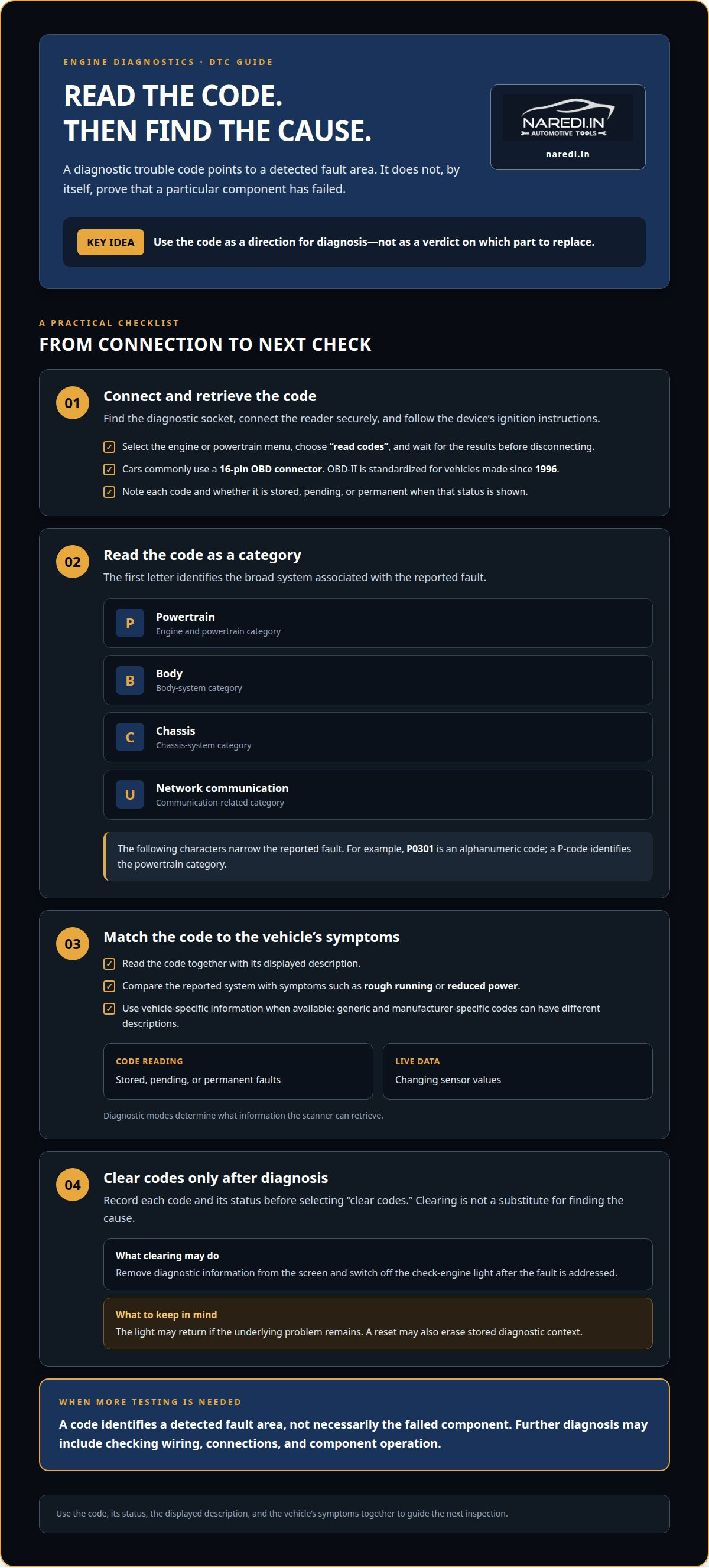
Plug the reader into the diagnostic socket, switch on the ignition, then select code reading. Cars commonly use a 16-pin OBD connector; OBD-II is standardized for vehicles made since 1996.
Engine Fault-Code Scanning
An engine fault-code reader retrieves diagnostic trouble codes from the engine control unit. It may display an alphanumeric result such as P0301. Treat that result as a direction for diagnosis, not proof that a specific part has failed. Read the code and its description together. Then compare the reported system with symptoms such as rough running or reduced power. This links the next inspection to the detected condition.
Diagnostic Modes and Code Categories
Diagnostic modes determine what information a scanner can retrieve. Code-reading modes show stored, pending, or permanent faults, while live-data modes display changing sensor values. DTC categories begin with a letter: P identifies powertrain, B body, C chassis, and U network communication. The following characters narrow the reported fault. Generic and manufacturer-specific codes can have different descriptions, so use vehicle-specific information when available.
Code Clearing and Light Resets
Record each code and its status before selecting “clear codes.” Clearing may remove diagnostic information from the screen. It can switch off the check-engine light after the fault is addressed, but the light may return if the underlying problem remains. A reset may also erase stored diagnostic context. Clear codes after diagnosis, not instead of finding the cause.
Connecting and Reading Codes
Find the vehicle’s diagnostic socket and connect the reader securely. Follow the device’s ignition instructions, then open the engine or powertrain menu. Select “read codes” and wait for the results before disconnecting. Compare each DTC with its displayed description and note whether it is stored or pending. For example, a P-code identifies the powertrain category, while a U-code indicates a communication-related category.
Bluetooth and wired scanner connections
A scanner may connect by cable, Bluetooth, or Wi-Fi. Choose a connection that suits your device and diagnostic workflow.
Bluetooth, Wi-Fi, and Cable Options
A wired scanner connects directly to the vehicle’s diagnostic socket, with its screen and controls built into the tool. It works without a phone or tablet. Bluetooth and Wi-Fi adapters send data to compatible software on a separate device, which can be convenient for viewing readings on a larger screen. Check that the scanner, app, and vehicle support the same connection method and diagnostic functions.
Bluetooth Pairing and Activation
To pair a Bluetooth adapter, plug it into the vehicle’s diagnostic socket, then switch on the ignition as instructed. Enable Bluetooth on your phone or tablet and select the adapter in its pairing menu. Open compatible diagnostic software and connect to the vehicle. If the app cannot communicate, confirm Bluetooth is enabled, the adapter is seated properly, and the selected device is correct. Some setups require pairing through the app rather than the phone’s settings.
Bluetooth ELM327 Scanners
An ELM327 scanner uses an interface that communicates between the vehicle and diagnostic software. Bluetooth mini ELM327 scanner tools have a stated range of 5 to 10 meters. Keep the phone within that range during a scan, and avoid moving farther away while data is being read. ELM327 identifies the interface type, not every function the complete setup supports. Software and vehicle compatibility still determine which codes and readings appear.
For a quick scan, Bluetooth lets you view the display on your phone while the adapter stays connected. A cable avoids wireless pairing and keeps the scanner’s controls at the socket. Wi-Fi is another wireless option, but both the scanner and receiving device must support it. Before choosing, match the connection to your device, app, and diagnostic task.
Comparison with ELM327 clones, professional scanners and dealer visits
Basic readers focus on retrieving codes; advanced scanners offer broader diagnostic functions. Codes point to detected conditions, while further testing helps establish their cause.
Vehicle Compatibility and CAN-Bus Support
Start with the vehicle’s make, model, year, and class. The C303 OBD2 scanner is described as compatible with 1996 and newer OBDII cars, SUVs, and light trucks. That example does not establish compatibility with every vehicle or system. CAN-bus support also matters: the scanner must communicate using a protocol supported by the vehicle. Check the device’s stated coverage against the vehicle before relying on its results.
Device Compatibility and Power Source
A Bluetooth adapter requires a compatible phone or tablet, operating system, and diagnostic app. A handheld scanner has its own screen and doesn’t need a separate display. Consider how the device is powered, too: a tool connected to the vehicle’s diagnostic socket can draw power there, while a wireless adapter relies on the connected device for its display and controls. The exact setup depends on the scanner.
Scanner Type Comparisons
Basic readers retrieve common engine codes and may clear them. Advanced scanners can offer live data or access to more vehicle systems, depending on their coverage. ELM327 clones vary in hardware and software compatibility, so a familiar interface name alone doesn’t establish broad function support. Professional scanners suit more extensive diagnostic workflows. A dealer visit can provide vehicle-specific diagnostic capability, but a reader cannot replace every test performed during a workshop diagnosis.
Diagnostic Accuracy and Mechanic Support
An OBD-II scanner reports the codes and data it can access when communication succeeds. It identifies a detected fault area, not necessarily the failed component. For example, an engine code related to a sensor circuit doesn’t prove the sensor needs replacement. A mechanic can test wiring, connections, and component operation to trace the cause. Treat the code as a starting point, especially if symptoms persist or several faults appear together.
OBD2 scanners for cars, bikes and multi-vehicle use
An OBD2 scanner’s coverage depends on the vehicle, connector, and supported systems. A car-focused tool may not communicate with a motorcycle or every vehicle in a mixed fleet.
For a car, check that the scanner’s listed coverage includes its make, model, and year. For a bike, confirm support for its diagnostic system and whether it needs a vehicle-specific cable or adapter. A connector that fits does not guarantee the scanner can communicate with the vehicle. Check both connection compatibility and supported functions before choosing.
Using one tool across multiple vehicles also depends on software access. Some diagnostic apps or platforms organise access by account, device, or vehicle coverage. Before choosing, list the vehicle types you need to scan and confirm the tool supports each one. For example, a household with a car and a motorcycle needs compatible coverage for both, not just a shared phone app.
Vehicle-specific adapters can connect a scanner to a different diagnostic socket, but they don’t add vehicle coverage the scanner does not support. Consider the scanner, cable, adapter, and software as one system. If a tool lists car support but no motorcycle coverage, an adapter alone does not make it suitable for a bike.
The right scanner depends on the vehicle and the diagnostic functions you need. A basic car code reader and a multi-vehicle device with broader system access serve different purposes. Software subscriptions, vehicle coverage, and required adapters can affect the setup, too. Compare supported vehicles and functions, not just the device price. Focus on the cars, bikes, or fleet vehicles you actually need to scan.
For your next step, select a diagnostic setup for your vehicles based on their classes, connectors, and required coverage.
Naredi.in
naredi.in offers automotive tools and equipment for vehicle-care needs. A DTC points to a detected condition, while a separate test may help assess a related system. For example, if an engine fault appears alongside starting trouble, a Battery Tester can assess battery condition, but it won’t identify the cause of the engine code. Battery Chargers, Jump Starters, and Performance Additives address other vehicle-care needs, depending on the situation.
Use the scanner’s code and vehicle compatibility as your guide when choosing the next step. If you need equipment for a related battery or vehicle-care task, explore the relevant options from naredi.in. Contact naredi.in to discuss your automotive-tool requirements.
Make your next diagnostic decision with confidence
A scan is most useful when it helps you decide what to investigate next. Before choosing an OBD scanner for engine diagnostics, consider which vehicles you need to scan and what functions your work requires. Keep the code as a reference for further diagnosis, not as an instruction to replace a part.
naredi.in offers OBD tools for readers choosing diagnostic equipment, along with Battery Chargers, Battery Testers, and Performance Additives for other vehicle-care needs. Select equipment that fits the task, then use the scan information to guide your next step. If you’re ready to explore diagnostic tools, contact naredi.in about OBD diagnostic tools.
Useful information makes the next step clearer. Choose the diagnostic tool and follow-up with care.
Frequently Asked Questions
How do I know what problem a DTC has detected?
An OBD scanner for engine diagnostics displays a DTC number and, depending on the device, its status and description. Compare those details with the vehicle’s symptoms to identify the reported problem area. For example, review stored and pending codes alongside available live readings before deciding what to inspect. The description narrows down the system involved; it doesn’t confirm a failed part. Record the full code before clearing it.
What is a DTC?
A DTC, or diagnostic trouble code, is an alphanumeric record generated when a vehicle control unit detects an operating condition outside its expected range. Its first character identifies a broad system group, such as powertrain or body, while the remaining characters narrow the reported condition. A DTC guides diagnosis; by itself, it does not confirm that a component has failed.
What is an OBD-II port?
An OBD-II port is the vehicle’s physical diagnostic connection for a compatible scanner. It links the device with vehicle electronics so the scanner can request diagnostic information. Cars commonly use a 16-pin connector, though its position varies by model. Use the correct connector, and follow the scanner’s ignition instructions to establish communication without forcing the plug.
What does an OBD scanner check in a car engine?
An engine scanner reads diagnostic trouble codes and, on supported vehicles, may display live data from engine-management sensors. Examples include engine speed, coolant temperature, and oxygen-sensor readings. These values can help show when a condition occurs and how readings change during engine operation. The scanner reports electronic information; it does not directly inspect compression, wiring condition, or physical damage.
Which OBD scanner types are compatible with cars in India?
Choose an OBD-II scanner whose compatibility list includes your vehicle’s make, model, year, and class. Confirm support for the specific petrol or diesel model and the diagnostic functions you need. Don’t assume every OBD-II-labelled device covers every system: cars, SUVs, and light trucks may have different coverage, and a bike may need a dedicated adapter and compatible software.
Which OBD scanners are best for petrol and diesel cars in India?
Choosing an OBD scanner for engine diagnostics starts with confirming support for your exact petrol or diesel vehicle and the engine data you need. Fuel type alone doesn’t determine compatibility; make, model, year, communication protocol, and software coverage matter. Code reading may be enough for routine checks. For deeper diagnosis, choose a device that provides the relevant live data and system access.